
Meet the trip1 browser extension: same hotel, lower price
Browse Booking.com as usual. The trip1 extension checks the same stay and shows you, right on the page, when trip1’s price is lower.

You've found the hotel. The dates are right, the room is right, and now you're opening tabs to see if it's cheaper anywhere else. The trip1 browser extension does that for you, on the page you're already on.
How it works
- Browse as usual. Search and open hotels on Booking.com, Expedia, Hotels.com, Agoda, Trip.com or Google Hotels. Nothing to type twice.
- trip1 checks the same stay. The same hotel, dates and guests, priced on trip1 in the background while you look.
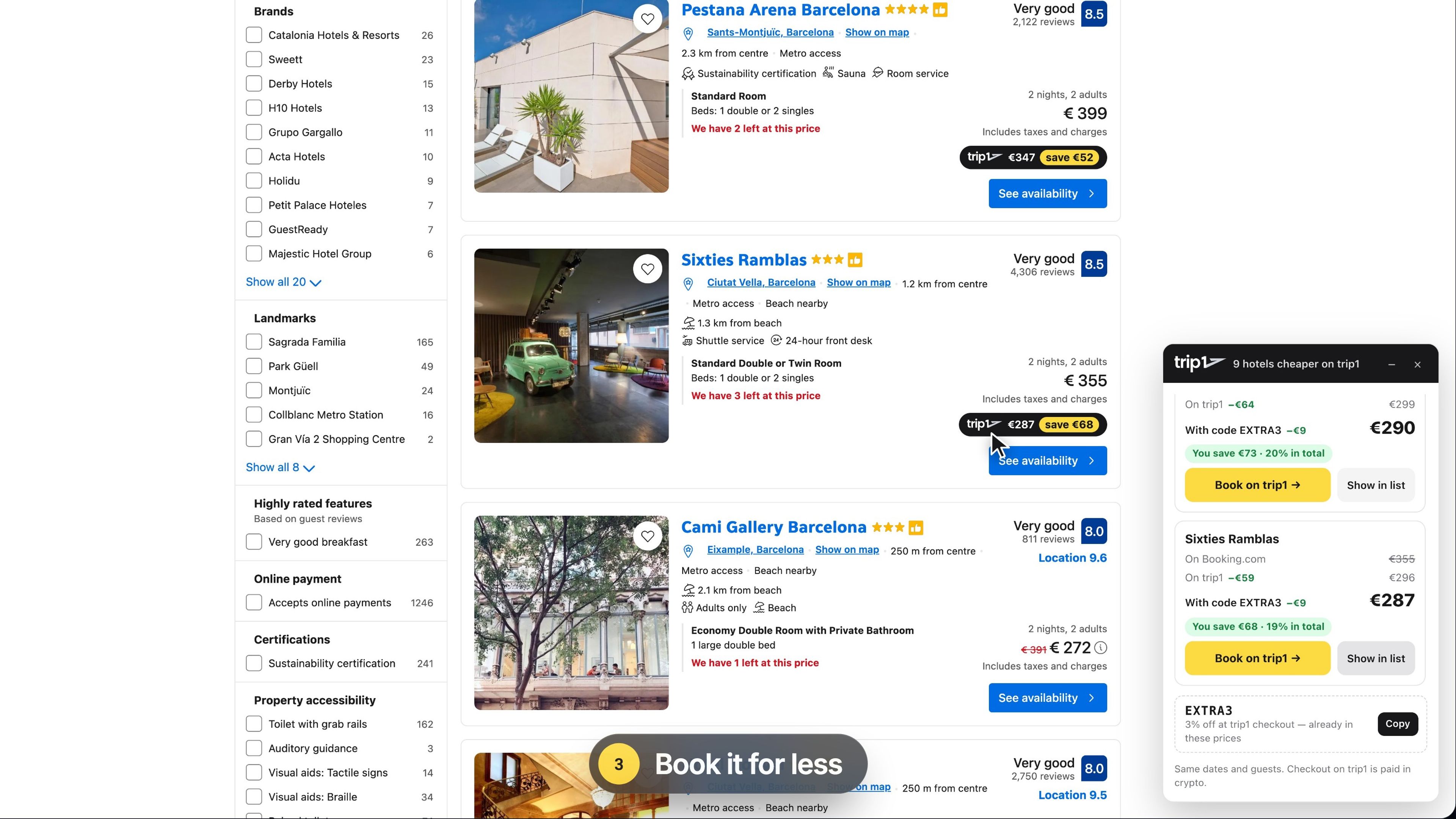
- Book it on trip1. When trip1’s price is lower, a small panel shows both prices and the difference. “Show in list” jumps to the hotel, marked with trip1’s price, and one click opens it on trip1.
A real example
In the video we searched Barcelona on Booking.com for 14–16 November, two adults. Hotel Acta Voraport was €326 on Booking.com and €298 on trip1, or €289 with the code EXTRA3 at checkout: €37 less for the same hotel and dates. Prices change all the time, which is exactly why it pays to check every time.
Is it the same room?
trip1 compares the same hotel for the same dates and guests, at the price each site shows. Room type, meals, cancellation terms and how taxes are shown can differ, so check them on trip1 before you book. Bookings on trip1 are paid in crypto, through CoinGate’s checkout.
What it reads, and what it doesn’t
The extension only runs on the supported hotel sites, and only reads what it needs to find the same stay: the destination, your dates, rooms and guests, and the hotels and prices on the page. It never reads other sites, and never collects your name, email or payment details.
Get it
The extension is free for Chrome, Edge and Firefox. See how it works and get it at trip1.com/browser-extension.
trip1 browser extension - FAQ
Yes. Installing it and comparing prices costs nothing, and you don’t need a trip1 account to compare.
trip1 sources hotel rates from multiple suppliers, so the same hotel for the same dates is sometimes priced lower on trip1 than on Booking.com or the other sites the extension supports. Prices move all the time, which is why it checks every stay you look at.
Nothing on the page. The panel only appears when trip1 is cheaper. Click the extension’s icon and it tells you there’s no lower price on trip1 for those dates right now.
When trip1 has a discount code running, the panel shows it with the price after the code, so the difference you see already counts it. Copy it from the panel and enter it at trip1 checkout.
trip1 compares the same hotel for the same dates and guests, at the price each site shows. Room type, meals, cancellation terms and how taxes are shown can differ, so check them on trip1 before you book.
It runs only on the supported hotel pages, and sends what it reads only to trip1, plus anonymous usage statistics. All of its code ships in the version the browser store reviewed, it adds no affiliate links or cookies to other sites, and it never changes the site’s own prices or bookings.
Booking.com, Expedia, Hotels.com, Agoda, Trip.com and Google Hotels, on Chrome, Microsoft Edge and Firefox 140 or newer. Get it from the Chrome Web Store (Chrome, Edge) or Firefox Add-ons.